
Hello. It’s been a while since my first post. A tragedy has struck my country, Türkiye, and in the past months, all of our efforts were focused on helping those in need, which made everything else in our lives take a backseat in the meanwhile. Disaster survivors are still mending their wounds and they will continue doing so for a long while. They are going to need continuous support to get their lives back together, so if you want to help them, you can follow this link to donate.
Thank you!
In my last post, I talked about the struggles we met when we tried to write a mystery story that also served the purpose of a dating sim.
We came up with a solution by researching how other authors approach a story that has multiple plot lines going on at the same time.
the solution: tables!
It feels like it should be common sense when you think about it retrospectively but using tables was something we’d never considered when we were writing before.
There were many things we needed to track for our story:
The clues, the romantic and platonic relationship progression, work days and school days of the main character, which characters know what to what extent, etc.
When we drew our table, it ended up looking something like this:
| Main Character | Character 1 🔍 | Character 1 ♥️ | Character 2 🔍 | Character 2 ♥️ | |
| Day 1 Monday | First day of work, event happens | Alibi: x Motive: y | Can flirt at x scene | Alibi: x Motive: y | Can flirt at y scene |
| Day 2 Tuesday | Talk to victim at the event location | Talk to them in x location | Can flirt if main character picks x option | Talk to them in x location | Can flirt if main character picks x option |
| Day 3 Wednesday (Day Off) | Can pick where to go freely. The game will give extra romance points for the first picked | If Character 2 is visited first, can ask about x clue. If not, the player will need to visit again before being able to proceed. | If visited first, can get +2 points. If they have all the romantic points from before, this triggers a new romance option | If Character 1 is visited first, can ask about x clue. If not, the player will need to visit again before being able to proceed. | If visited first, can get +2 points. If they have all the romantic points from before, this triggers a new romance option |
| Day 4 Thursday | And so on… |
This helped us have an overview of all the moving parts of our story. We wanted enough wiggle room to add new scenes while we actually wrote it, so we didn’t go too much into detail. We knew at which point we wanted to hit which story point and it helped us enough to come up with an outline.
flowcharts
What we did next was to give headings to all the individual scenes and make a flowchart on Twine to keep track of which scene follows which. We added the notes in our table to the Twine cards and started writing, scene by scene. We used tags with color codes to track which of the scenes were written, in-progress, or not started yet.

The image above has the titles removed to avoid spoilers, but they have scene names on them with their respective numbers. Thanks to this, we could keep track of our branching stories and which scenes we haven’t written yet, while also allowing us to write the scenes out of order.
task board
My friend and I live in different time zones, so it was important for us to be able to work asynchronously. We started to work in weekly sprints, with daily meetings every workday. Sometimes they are as short as 15 minutes long, sometimes we need to work on something together and they last hours. So, they are not exactly the “Daily Meetings” of the Scrum method in the strictest sense. Since we are only two people, we usually go by ear instead of sticking to one agile methodology.
We set up a Notion workspace to use as our game’s wiki but also to have a board to track what we are working on. Here’s a screenshot of how our first sprint looked like:
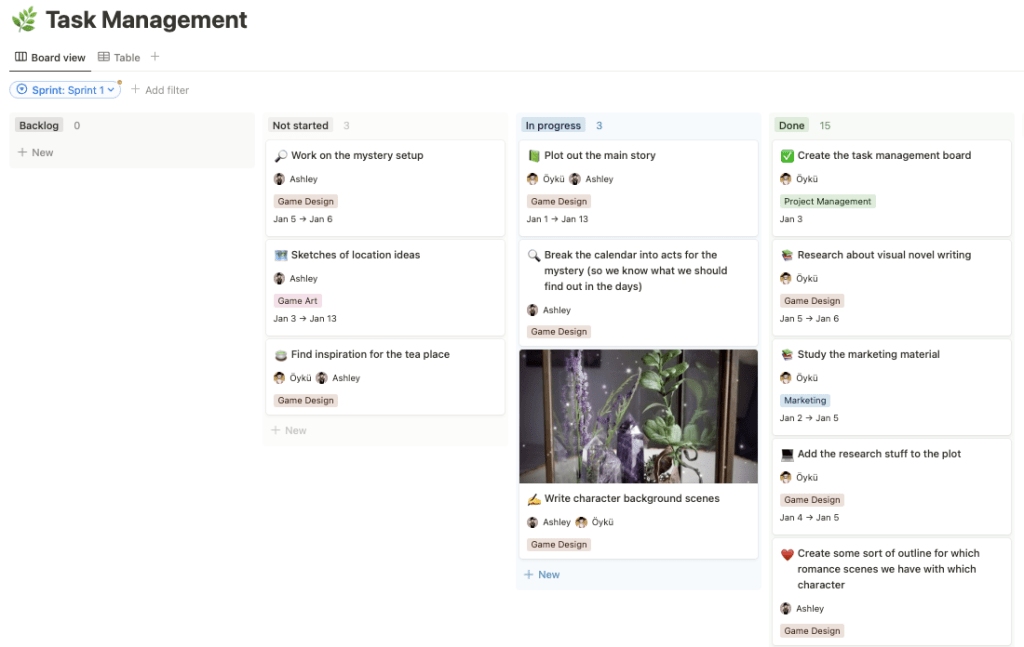
When we started writing the game, we created cards on our board for every scene we named in Twine, so that we could track who was working on which scene and how many scenes were left that we needed to write. With this approach, not only we wrote a rough draft of our entire game, but we also wrote the detailed first draft of our demo within a month.
It took us a while to set up a system that worked the best for our purposes, but once we did, things started progressing pretty quickly. Right now, we are coding the functionalities and making the art of the demo, that we plan to release in late Summer. In my next post, I will be sharing our experience of creating the MVP of our demo.
Thanks for reading!
 Oyku the Game Witch
Leave a comment